Vibe Coding a MacOS App
Every human that ever lived: “We are living in special times”. Perhaps this time this is really true, as we are seeing paradigms around our digital presence being shifted faster and faster.
AI is not only shaking up how we interact with the internet, but also how we present ourselves and it is more and more taking over some of the gruntwork that comes with developing applications we appreciate and use in our day-to-day lives!
Yes, sometimes this goes spectacularly wrong, like that time when that one vibe coded app lost its OpenAI Access Key and ended up footing an unexpectedly large bill! Perhaps unsurprisingly, a lot of public commentary originated from our underlying fears around robots taking our precious jobs.
But fast forward one year, dozens of benchmark tests and we are starting to see the contours of a new AI-centric IT industry. Applications developed with the help of AI-assistants are starting to look better and better. Probably not good enough yet to take over some of our stable foundations, but for little pet projects it is starting to be promising.
So, I decided to put it to the test and take a swing at one particular problem. In an earlier blogpost I explained how Crossplane can be compared to Kubernetes, and how Crossplane looks at the future of infrastructure management. Nonetheless, Crossplane also has obvious drawbacks as compared to the more traditional pipeline-based way of managing infrastructure through code, like for example cognitive load or financial costs. Although these “continuous” delivery are probably never going to be as efficient as Crossplane-based infrastructure change deliveries, it turns out we can already improve our overall throughput significantly if pipelines do not have to wait that long for manual approval steps!
Yes, delayed manual approvals. Or, those approvals that are pending for your approval while you went to get a coffee, got distracted by something else or got pulled into a meeting, and forgot altogether about this sad pipeline awaiting your command.
ADO Companion
Well, rather than having to go back and forth across different screens to track the progress of the running pipelines (and PRs), I’ve decided to build a little interface that automatically does this for you. It simply polls the status of running jobs and pending PRs, and displays them to you. You can choose yourself which Azure DevOps projects you want to include.
Here is a fake screenshot, which I generated based on an actual screenshot:
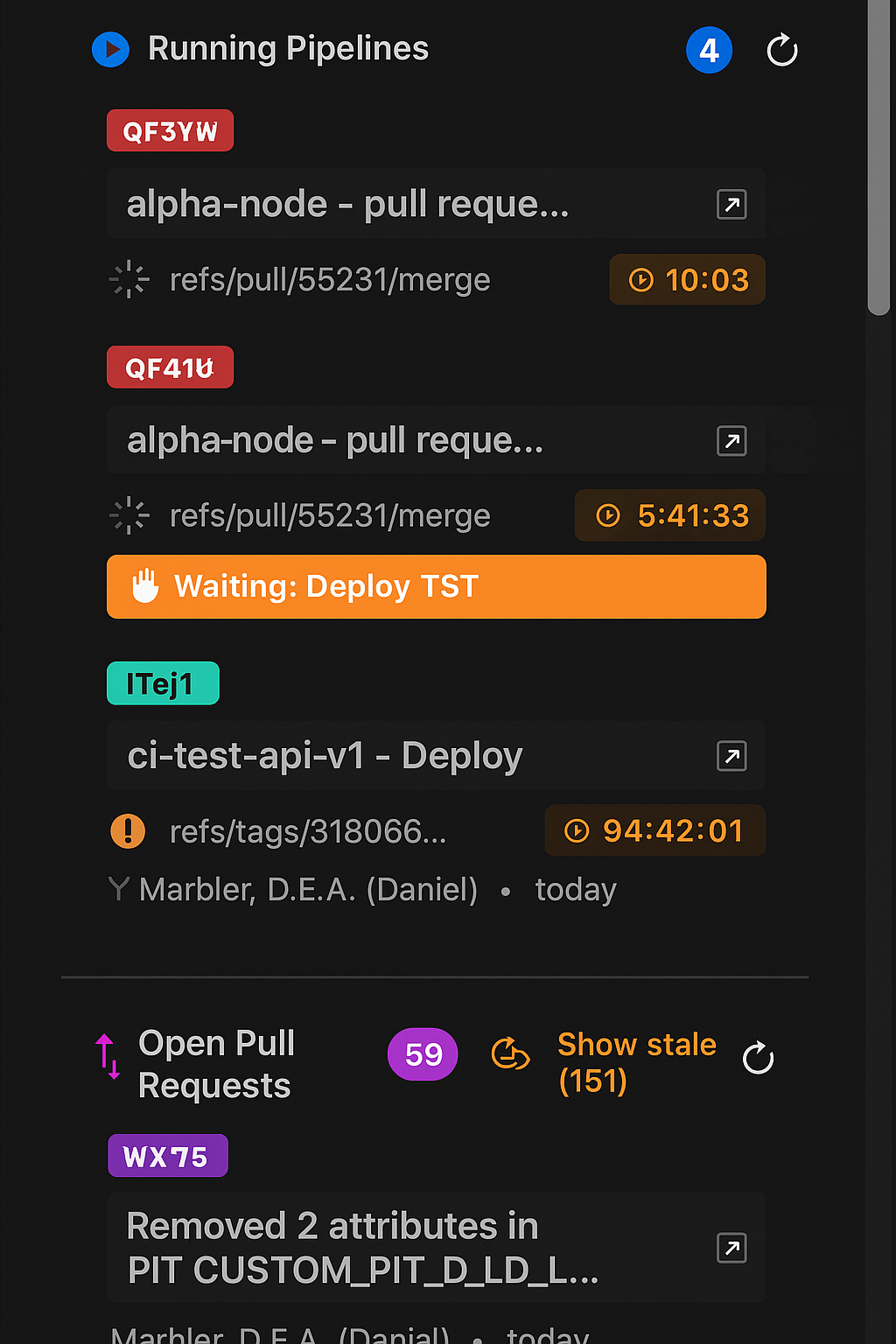
Note that I have vibe-coded this whole application. It was written through Swift and AppKit, Apple’s developer framework used to build graphical, event‑driven user interfaces on macOS. For me this was the first time working with this technology stack. Moreover, having worked mostly in domains around DevOps, Data- and Cloud-Engineering, MacOs desktop applications are very unknown territory to me!
The little side-panel consists of two windows; one for showing the running pipelines and open PRs, and one for managing the settings. Here you can submit your Personal Access Token, which gets stored locally in your keychain. Next to that, you will also see a couple of options here around window management. It turns out that this was the most tedious part of set up, and I really had to work hard explaining to my AI-assistant what it should achieve as well as how hard it should work. That is, if you want the side-panel will always be visible and move other windows to the side to make room for itself. Even when you switch desktops, it will move other windows. At the same time, it restores windows when it hides. I have seen it to work, but I wouldn’t be able to explain you the exact details. Somehow, somewhere, there is a feature within AppKit that allows you to find the currently active windows and configure their size.
I did learn throughout the process what Accessibility settings apply to, and that they are looking at individual exact underlying paths. This is problematic if you have multiple builds are different paths and no longer know which build you are actually running and looking it, because the system settings might have setting for a different path while showing you the same name. Ah, well. Details perhaps.
Conclusions
All in all, “developing” this application took me a couple of hours of intermittently babysitting Claude Opus 4.5 while working on some other things.
And I must say, I had fun while doing it! And it also brought me some more empathy for those that are regularly reviewing AI-based code as part of their work.
What I have learned:
- Do not expect your AI-assistant to understand you well, but make sure by iterative prompting that it has understood your intentions.
- Work iteratively on smaller parts of the solutions as a whole, and fix solutions as they arise rather than over-specifying and over-planning. In other works, work agile.
- Vibe coding works well over well-documented, predictable frameworks
- Vibe coding works well over good abstractions and coding languages that by design limit what code can make it through production through syntax, so without having to write explicit tests for it
Perhaps unsurprisingly, good software development practices turned out to be key. SOLID, Agile, DRY, DevOps, Platform-mindset, etc, etc. I think that also makes sense, since the process around the development of this code has largely remained the same. It’s just that the manual development was automated away.
Right so. Last thing, I am not sure yet whether this little solution is going to help engineers in their work and help them keep their flow. I believe so, but it has not yet been tested.
If you’re interested in trying it yourself, I can share a dmg-file with you or show you some of the source-code. Obviously, use at your own risk! Just reach out to me, you can find my contact information in the footer.